
Login in WinLion Casino gives you access to your account balance, bonuses, game history, and betting slips. The process works on desktop browsers and mobile devices. Security uses SSL encryption to protect data. Two-factor authentication adds another layer if you turn it on.
Registration Before You Can Log In
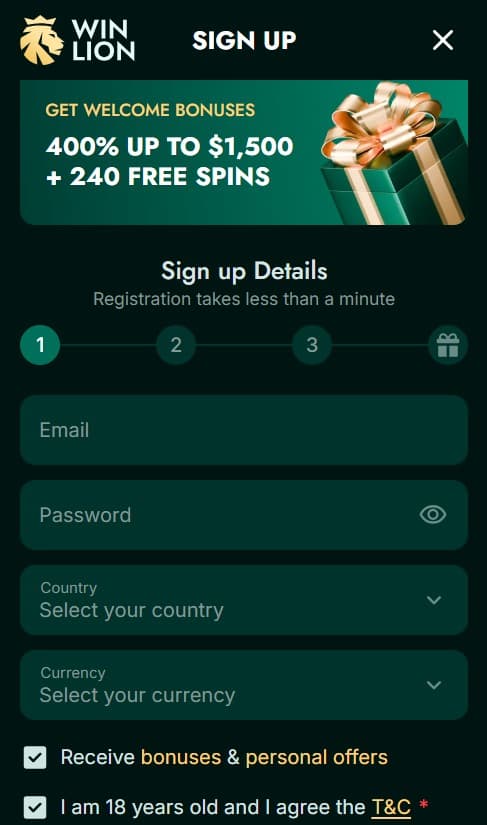
You must create an account first to log in. The registration form asks for basic information. It usually takes one to two minutes.
- Open winlion.com in your browser.
- Click the “Sign Up” button at the top right of the page.
- Type in your email address.
- Choose a password that includes uppercase letters, lowercase letters, numbers, and symbols.
- Select your currency – CAD works best for Canadian players to avoid exchange fees.
- Confirm you are at least 18 years old and agree to the terms.
- Click submit to finish the form.
A confirmation email arrives in your inbox right away. Open it and click the verification link inside. This activates the account. Some players get the email in spam, so check there if it does not show up quickly.
After verification, log in once and go to your profile. Add your full name, enter your date of birth, address, phone number, and postal code. Fill these fields correctly because they match documents during withdrawal requests later. Incomplete profiles can delay payouts. Follow the terms and conditions to enjoy games without issues.
Verification Process After Registration
WinLion requires KYC verification for withdrawals and higher limits. Upload documents in the account section under verification or security settings.
Accepted ID documents include a passport, driver’s license, or national ID card. The photo must be clear, show both sides if needed, and match your registered name. For proof of address, use a utility bill, bank statement, or government letter dated within the last three months. It must show your name and address exactly as in your profile.
Payment verification sometimes asks for a screenshot of your card (hide middle digits) or an e-wallet statement. The casino reviews files within 24 to 72 hours in most cases. Approved accounts process withdrawals faster. Canadian players submit local documents without problems. Do this step soon after registration to avoid waiting when you want to cash out.
How to Log In to Your WinLion Account
Go to the official site winlion.com each time. Do not use saved links from emails or ads in case they lead to fake pages.
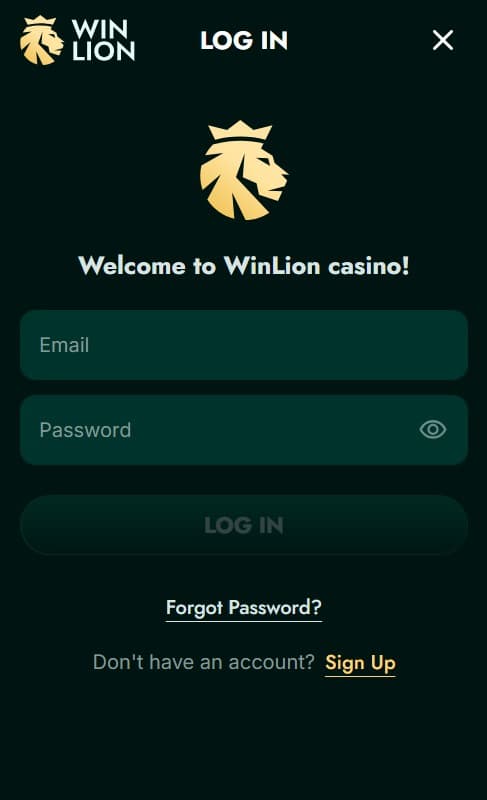
Find the “Login” button in the top right corner. It sits next to the sign-up button. Click it to open the form. Enter the email you used during registration. Type your password exactly – watch for caps lock and keyboard layout. Click the login button or press enter.
The page loads your personal dashboard. You see your balance, active bonuses, recent games, and quick links to slots, live casino, or sportsbook. Sessions stay active for a while, but log out if you step away.
Enable 2FA in account settings for better protection. It sends a six-digit code to your phone or email on every login from a new device. This stops access even if someone knows your password.
Password Rules and Changes
Use a password of at least 12 characters. Include different types: A-Z, a-z, 0-9, and symbols like ! @ #. Do not reuse passwords from other sites. Avoid names, dates, or simple sequences.
Change your password every three to six months. Also change it if you get an email about a login from an unknown location. Go to settings, find security or password section, enter the old one, then set a new one twice to confirm.
If you forget your password, click “Forgot Password” under the login form. Enter your email. A reset link comes within minutes. Click it and set a new password. The link expires after a short time, so act fast.
Fixing Login Problems
Wrong password shows an error message. Use the forgot password option first. Reset and try again. Account not activated blocks login. Check your email for the confirmation link and click it. Resend the email from the registration page if needed.
Browser problems happen from old cache. Clear cache and cookies in settings. Try incognito mode or a different browser like Chrome, Firefox, or Edge. Update your browser if it runs old version.
VPN or proxy can trigger blocks. Turn off any VPN before login. Canadian IP addresses work without issues. If you travel and use foreign IP, contact support to check.
Multiple failed attempts lock the account temporarily. Wait 15-30 minutes and try again. Persistent issues need live chat. Open chat from the site footer or help section. Tell them your email and describe the exact error message. They check your account status and fix most problems quickly. Support answers in under two minutes on average.
Mobile Login at WinLion Casino
No dedicated app exists for Android or iOS. The mobile site handles everything. Open winlion.com in your phone browser like Chrome or Safari.
The page adjusts to your screen size. Tap “Login” at the top. Enter email and password. The keyboard pops up for easy typing. After login, games and bets load without lag on good connection.
Add the site to home screen for quick access. On Android, tap the three dots menu and select “Add to Home screen.” On iOS, tap share icon and choose “Add to Home Screen.” It creates an icon like an app. Tap it to go straight to the login page.
Mobile login supports the same features. Play slots, join live tables, place sports bets, claim bonuses, and request withdrawals. Touch or Face ID works if your phone has it and browser allows biometric login. Data use stays low for most sessions.
After You Log In Successfully
Check promotions tab first. Activate welcome bonus if you have not claimed it. Look for daily or weekly reload offers. Browse game sections: slots, table games, live casino, jackpots, or sportsbook. Use search bar for specific titles. Filters sort by provider, popularity, or new releases.
Loyalty program tracks your bets. Earn points for every wager. Reach levels for better cashback, higher limits, or exclusive bonuses. Tournaments run often with prize pools. Set limits in responsible gaming section. Choose daily deposit caps, wager limits, session timers, or cool-off periods.
Logout when finished. Click your profile icon and select log out. This ends the session completely.
Frequently asked questions
ᐈ Is account verification (KYC) required on WinLion, and why?
✅ Yes, KYC is required. It follows international rules and stops fraud for you and the platform. It takes up to 5 minutes after sending documents. Accept photo ID (passport, driver’s licence, national ID) + proof of address. System is automatic, encrypted, fast, and private.
ᐈ What is two-factor authentication (2FA) on WinLion?
✅ WinLion uses strong password encryption and secure tokens. No app or SMS 2FA since 2025. Adaptive protection spots trusted devices and asks extra checks only for odd logins or withdrawals. Quiet, always-on security that never annoys.
ᐈ What should I do if I forget my WinLion account password?
✅ Click “Forgot Password?” on login. Enter your email to get a secure reset link. Passwords stay encrypted; resets use safe channels (PCI DSS). Pick a strong password and change it often. Support is 24/7 if needed.